Advanced Phone Technology
The team at Media Group is always looking for the very best digital technology for businesses to use on their phone lines.
Many new telephone systems can run a message on hold program, welcome message, after hours message, queue messages and menu prompts on their own. Systems without that function can use carefully selected on hold hardware to play our professional phone messages.
Two Ways to Play Your Messages
MOH1200 on hold player
Market-leading digital on hold equipment for phone systems that need an external player.
Audio files for your system
Built-in on hold facility? We supply files in the correct phone format.
Setup help
We can assist with the technical setup of your telephone audio productions.
Telephone Messages On Hold Equipment
The MOH1200 Digital On Hold System is the market leader in high-quality telephone digital message equipment, with user-friendly features that keep it running faultlessly.
Your telephone messages on hold load from a standard USB thumb drive, which connects directly to the unit's onboard memory like an external hard drive. Updating is as simple as copy and paste. Units come with a 3-year warranty.
On Hold Audio Files
If your telephone system has its own built-in facility for phone messages, we can provide audio files in the correct phone format. Just tell us which phone system you have, and we'll produce your recordings to suit.
Capabilities of Our Phone On Hold Equipment
Our on hold equipment has been selected for its capabilities, including:
- Plays your program on a loop
- Schedules messages for certain periods
- Makes updating your message on hold program easy
- Plays crisp, clear audio
- Easy installation of audio productions
- Requires little maintenance
- Sounds professional
Connection
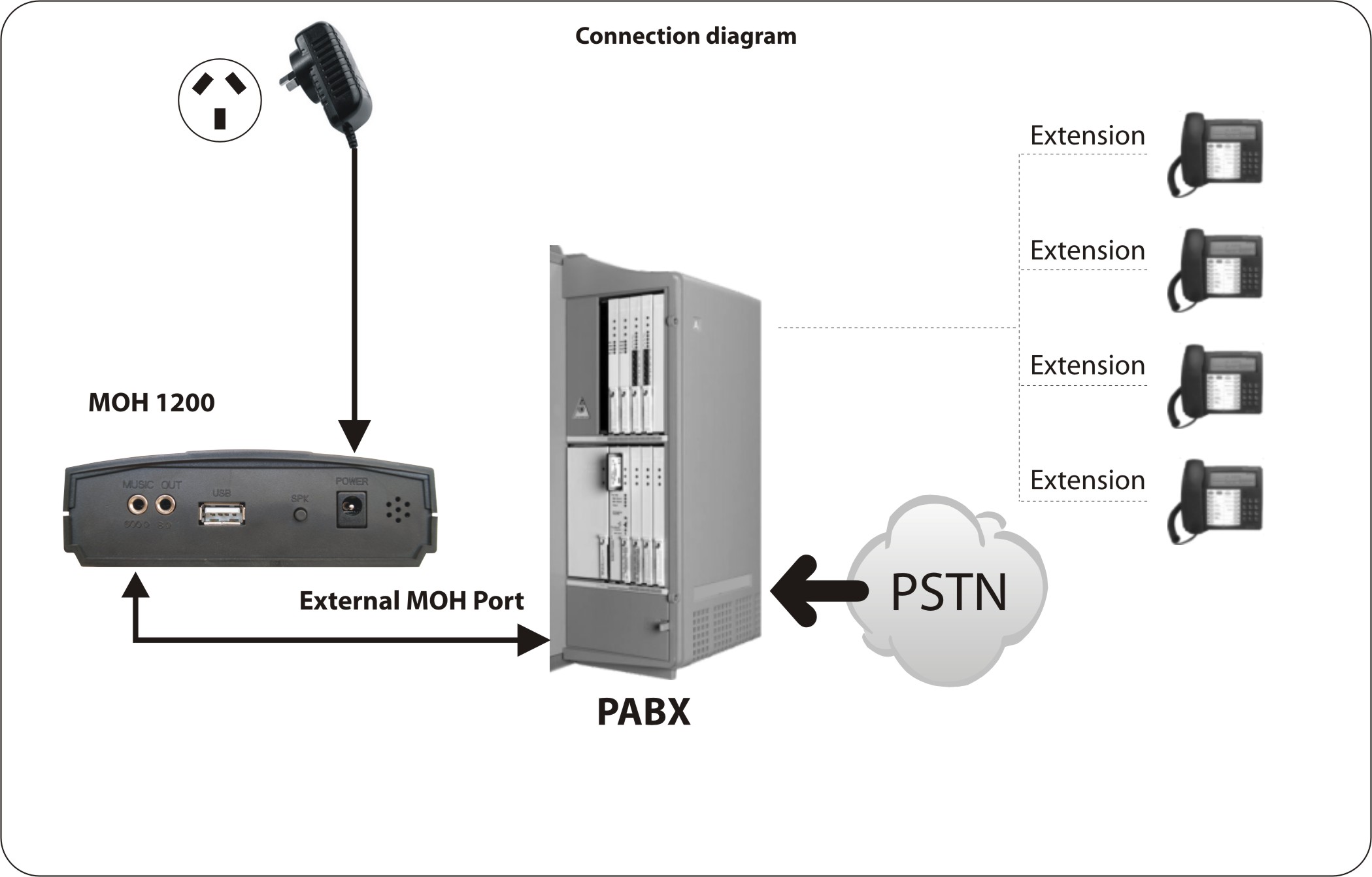
Connecting the MOH1200 USB player is a simple plug-and-play operation. If your phone system has no audio input socket, your telephone technician will need to hardwire an audio cable for you.
Get Your Messages On Hold Playing
Not sure whether you need a player or just audio files? Ask us and we'll help you work it out.
Get a free online quote Request a free demo
On Hold Hardware FAQ
Do I need on hold hardware?
Only if your phone system cannot play messages on hold itself. Many modern and hosted systems accept audio files directly, and we supply them in the right format.
How do I update messages on the MOH1200?
Copy your new message files onto a standard USB thumb drive and plug it into the player. Updating is as simple as copy and paste.
How does the MOH1200 connect to my phone system?
It plugs into the audio input socket on your phone system. If there is no socket, your telephone technician can hardwire an audio cable.
Is there a warranty?
Yes. MOH1200 units come with a 3-year warranty.